
Download Wine List – Wine Tasting Notes, Rating, and Tracking Tool
Overview
Wine List – Taste Rate Notes is a free Android application designed for wine enthusiasts, sommeliers, and casual drinkers who want to organize and reflect on their wine experiences. The software enables users to record tasting notes, assign ratings, and maintain a personal wine log. It serves as a digital companion for tracking bottles consumed, favorite varietals, and memorable tasting sessions. By centralizing wine-related data, the app helps users refine their palates, plan future purchases, and share insights with fellow connoisseurs.
Target users include individuals who enjoy wine tasting at home, attend wine events, or manage a personal collection. The app’s simplicity makes it accessible to both beginners and experienced tasters. It supports the documentation of sensory details such as aroma, flavor, and finish, which can be invaluable for personal development or professional use in hospitality and retail. The developer, Sebastian Perner, has focused on creating a lightweight, intuitive tool tailored to the needs of wine lovers.
The application was released on February 1st, 2024, and is available exclusively in English. It is designed for Android 13.0 and above, ensuring compatibility with modern devices. While the app is free to download and use, no additional monetization details were provided. Real-world usage scenarios include logging wines from a dinner party, tracking seasonal preferences, or building a personal wine journal for future reference.
Key Features & Capabilities
- Personal Wine Journal – Create and manage a digital log of wines tasted, including details such as name, vintage, region, and tasting date. This feature supports long-term tracking of personal preferences and wine consumption habits.
- Tasting Notes System – Record sensory observations such as aroma, flavor profile, body, and finish. Users can input custom notes to capture unique characteristics of each wine, enhancing the depth of their experience documentation.
- Rating & Scoring – Assign numerical or star-based ratings to wines for easy comparison and ranking. This functionality helps users identify favorites and avoid repeating less enjoyable selections.
- Search & Filter Functionality – Quickly locate specific wines by name, region, grape variety, or rating. This improves usability when reviewing past entries or preparing for future tastings.
- Offline Access – All data is stored locally on the device, allowing full functionality without an internet connection. This ensures privacy and reliability, especially when using the app at events or in remote locations.
These features collectively support a structured approach to wine appreciation. For example, a user might log a bottle of Pinot Noir from Burgundy, noting its earthy aroma and balanced acidity, then rate it 4.5 out of 5. Over time, this data can reveal trends in preferred styles or regions. The app’s minimal design prioritizes usability, making it easy to add entries quickly after a tasting session.
User Interface, Workflow & Performance
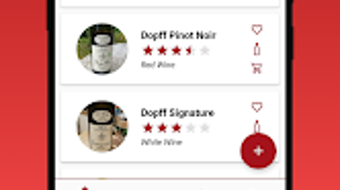
The user interface of Wine List is clean and focused, emphasizing functionality over visual flair. Navigation is straightforward, with a main dashboard displaying a list of recorded wines, accessible via a bottom navigation bar. Each entry can be edited or deleted with simple gestures, reducing friction during data management.
Workflow efficiency is enhanced by a streamlined input process. Users can add a new wine with minimal taps, selecting from pre-populated fields or entering custom details. The app’s design encourages rapid data capture, which is essential for recording tasting notes immediately after consumption.
Performance observations are based on general software behavior patterns. The app has a file size of 3.4 MB, suggesting a lightweight footprint. The developer did not specify resource usage details, so CPU and RAM behavior cannot be confirmed.
However, given its small size and offline nature, it is expected to operate smoothly on modern Android devices. Stability appears consistent, as the app has been released in version 1.3.4 with no reported issues. No performance benchmarks were provided.
Compatibility & System Requirements
Wine List is compatible with Android 13.0 and above. This ensures support for current and recent devices, including smartphones and tablets with updated operating systems. The application is available exclusively on the Android platform, with no information provided about iOS or other mobile ecosystems.
The installation size is 3.4 MB, which is minimal and suitable for devices with limited storage. The developer did not specify exact hardware requirements, such as processor speed or RAM capacity. Therefore, compatibility with older or low-end devices cannot be confirmed. The app is designed to function without an internet connection, relying solely on local storage for data persistence.
Platform compatibility information is limited to the stated OS version and file size. No additional system requirements were listed, and no testing results were shared. Users should ensure their device meets the minimum Android version to install and run the software successfully.
Pros and Cons
Pros
- Free to download and use with no in-app purchases or ads mentioned
- Lightweight design with a small file size of 3.4 MB
- Offline functionality ensures privacy and uninterrupted use
- Simple, intuitive interface ideal for quick data entry
- Supports detailed tasting notes and personalized ratings
Cons
- Available only on Android, with no support for iOS or other platforms
- Only available in English, limiting accessibility for non-English speakers
- No information provided about cloud sync or backup options
- Developer did not share system requirements beyond Android 13.0
- Version 1.3.4 has no public changelog or update history details
FAQ Section
Is Wine List available for iOS devices?
Currently, the application is only available for Android. There is no information about an iOS version or future platform expansion.
Can I use Wine List without an internet connection?
Yes. The app is designed to function entirely offline. All data is stored locally on the device, allowing full access to your wine logs without requiring an internet connection.
Does Wine List support cloud backup or synchronization?
The developer did not provide details about cloud sync or backup features. All data is stored locally, which may affect data recovery if the device is lost or replaced.
Is Wine List safe to download and use?
Wine List is published on Softonic, a trusted software distribution platform. The app requires Android 13.0 or higher and has a small file size, which reduces the risk of malicious content. However, users should always download from official sources to ensure safety.
How often are updates released for Wine List?
Version 1.3.4 was released on February 1st, 2024. No public update schedule or changelog was provided. Future updates may include bug fixes or minor improvements, but no specific details are available.
Final Thoughts + CTA
Wine List – Taste Rate Notes offers a focused, no-frills solution for anyone looking to document and reflect on their wine experiences. Its lightweight design, offline functionality, and intuitive interface make it a practical tool for both casual drinkers and dedicated enthusiasts. While it lacks cross-platform support and cloud backup, its core features are well-executed and purpose-built for wine tracking.
For users who value privacy, simplicity, and ease of use, this app stands out as a reliable choice. It is particularly suited for those who prefer to keep their tasting data local and avoid complex setups. The free availability further enhances its appeal, especially for newcomers to wine journaling.
Download Wine List now to start building your personal wine collection and tasting history.







